Do you format quotations to stand out from the main text?
Loading last updated info...
Quotations should not blend into the rest of your message. Whether you're responding to an emailm, IM message, or writing content for the web, formatting quotations clearly helps readers understand what’s being quoted and what's your original content.
Generally, the best practice is to start a quote on a new line and indent it, then use either quotes or the greater-than sign to make the text visually distinct and easy to follow.
Software development can be painful and costly. Hang on, that should say "Software development is painful and costly"
❌ Figure: Bad example - The quotation is mixed up with main text
Software development can be painful and costly. Hang on, that should say:
"Software development is painful and costly"
🙂 Figure: OK example - The quotation has quote marks, on a new line and indented
Software development can be painful and costly. Hang on, that should say:
> Software development is painful and costly
✅ Figure: Good example - The quotation has greater-than sign, on a new line and indented
💬 For IMs
IMs are fast and casual, but things can get messy without context. Quoting properly helps maintain clarity in ongoing conversations, especially in busy channels or group chats.
The best way is to use the platform’s native reply feature. This keeps context visible and linked to the original message.
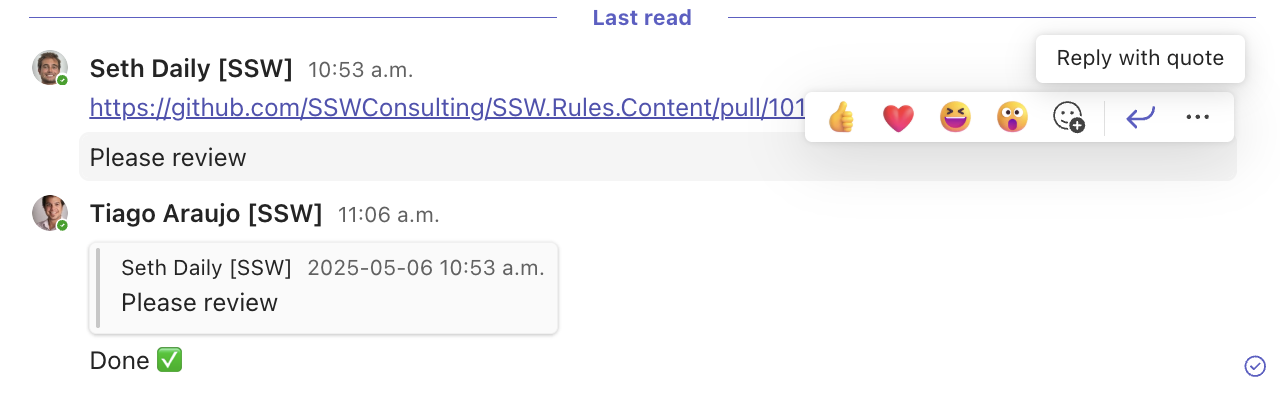
Figure: Replying feature in IM helps keeping the conversation organized
Notes:
- For short references inside a long message, you may copy the important part and paste using the inline quotes
> - When quoting older messages OR messages in group chats, mention @username to clarify who said what
Tip: Use reactions (e.g. ✅, 👍, 👀) when you don't need a quote — they're quicker and reduce message volume.
📧 For emails
In email replies, quoting previous messages is essential for context. The standard convention is to prefix quoted lines with a greater-than symbol > and indent the text, which makes the quoted text clearly identifiable — even in plain-text emails.
Email reply example
To:
Bob
Subject:
Northwind - April report
Hi Bob
> Can you send the report by Friday?
Sure! I’ll send it over by end of day.
✅ Figure: Good example - This simple formatting makes conversations easier to follow, especially in long email threads
🖥️ For Web UI
In web design, it's important to make quotations stand out from surrounding text. You should:
- Place the quote on a new line
- Use quotation marks for clarity
- Style it visually with a different font style, spacing, italics, or borders
Use the semantic <blockquote> HTML tag to indicate a quotation, and apply CSS to enhance visibility.
HTML example
<blockquote>"Design is not just what it looks like and feels like. Design is how it works."</blockquote>
CSS example
blockquote {border-left: 4px solid #f5f5f5;margin-top: 1rem;padding: 1rem;}
Markdown example
If you're using Markdown, simply prefix the quoted text with a > symbol, and it will automatically render as a blockquote:
> "Design is not just what it looks like and feels like. Design is how it works."
This is how it renders in the browser:
"Design is not just what it looks like and feels like. Design is how it works."