-
Set as Startup for Windows Forms
In .NET Windows Forms, there will be an option Set as Startup
Form to be consistent with Web forms.
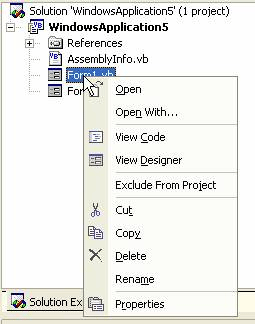
Figure: Please add 'Set as Start Form' option
|
Update: Visual Studio .NET 2005 Beta 2 - Not done
This has not been fixed in Visual Studio 2005 Beta 2.
|
-
Startup Object Property
The combo box control in this property grid needs to be more
visible. Sometimes it is visible, sometimes not.
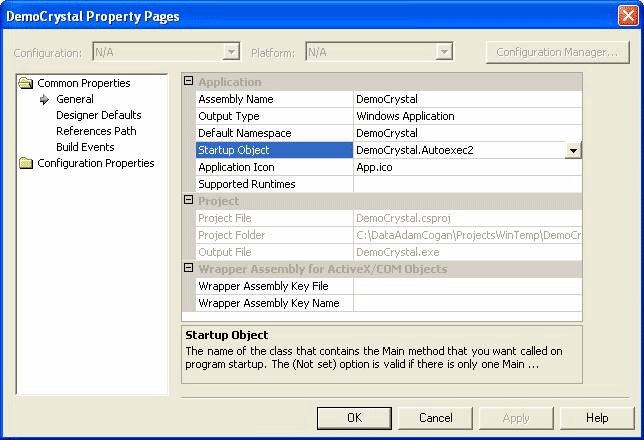
Figure: Now you see the combo...
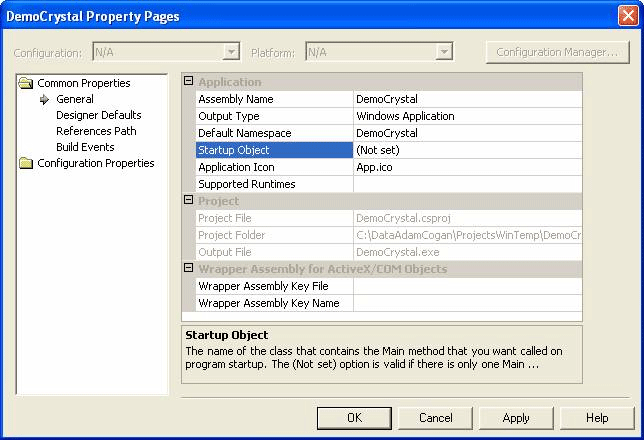
Figure: Now you don't!
The property is also inconsistent between C# and VB.NET. C# only
lists classes which have a Main method. VB.NET lists all forms
as well as classes with a main method. This is because VB.NET
does not create a Main method if the Startup object is set to a
Form. Instead:
-
VB.NET will always create a Main method for consistency with
C#.
-
All Forms will be listed in both languages. If a Main method
does not exist and a Form without one is selected, the Main
method will be created.
|
Update: Visual Studio .NET 2005 Beta 2 - Not done
This has not been fixed in Visual Studio 2005 Beta 2.
|
-
Automatic Code Auditing
Certain coding practices will be able to be banned. e.g. empty
catch blocks, variables which do not follow naming conventions,
etc. We have fixed this ourselves with a combination of
Code Auditor
and Microsoft's FxCop tool, which allows you to create custom
rules.
|
Update: Visual Studio .NET 2005 Beta 2 - Fixed
FxCop is now integrated into Visual Studio .NET, and
with Team Foundation Server, you can run rules over
source code before allowing pending checkins.
|
-
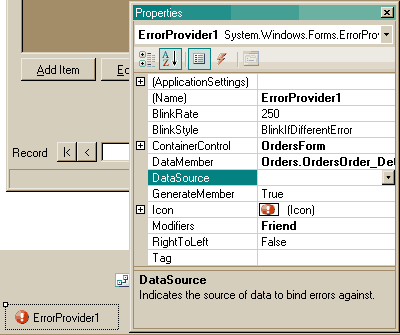
Gracefully change and delete datasets from the designer
Have you ever deleted a dataset from the designer only to lose all
your control bindings? We think a less frustrating and more useful
solution is to:
-
If you delete a dataset, a window pops up list all the
controls that are bound to this dataset. In this window you
can choose to re-map the controls to an existing or new
dataset.
-
There will be an option to change the source of a dataset,
e.g. if you have a data set in the designer bound to
"DataSets.Categories" and you want to change it to bind it to
"DataSets.SubCategories" without losing your form bindings.
-
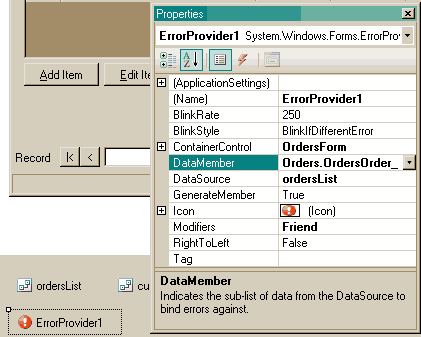
-
Figure: If I delete any dataset here I lose all my form
designer bindings. A confirmation dialog will pop up letting
me know all controls that are bound to this dataset and allow
me to change the dataset the controls are bound to or cancel
the operation
-
Back and Forward Buttons will Look Like Internet Explorer
The Backwards and Forwards buttons to move between different code
locations and files in Visual Studio .NET are are hard to
discover, because the icons do not resemble those in Internet
Explorer.

Figure: Did you know what these buttons were for?
|
Update: Visual Studio .NET 2005 Beta 2 - Fixed
The icons in Visual Studio .NET 2005 are an improvement on
Visual Studio .NET 2003, but still not quite as obvious as
we would like.

Figure: The new icons are better, but still not like
Internet Explorer.
|
-
Folder Delete Option
As shown in the screenshot, Visual Studio allows you to quickly
and easily remove a project from a solution, via the popup menu
in Solution Explorer. It would be good if there was also a
command for removing the project file itself. This would save
the user having to close VS, remove the project manually then
re-open VS, which is what normally has to be done. And while
we're on this topic, a command like 'Open in Explorer' could
also make manipulating files in a project more convenient.
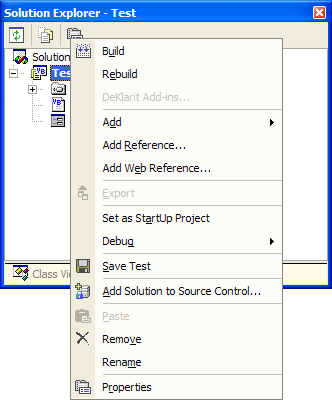
Figure: Right-clicking on a project in Solution Explorer.
|
Update: Visual Studio .NET 2005 Beta 2 - Not done
This has not been fixed in Visual Studio 2005 Beta 2,
but Microsoft have acknowledged it for a future release.
Microsoft pointed out that it would be relatively easy
to write an add-in to achieve this functionality.
However, we would have liked a command where you could
at least open the folder in Windows Explorer.
|
-
.NET References List
The list box on the .NET tab of the Add Reference dialog in
Visual Studio (Project > Add Reference...) lists all
available .NET components. (See screenshot below.) As .NET
components are added to the system over time, this list box may
end up containing thousands of items
This is a bad idea for two reasons:
-
It is difficult for users to find what they're looking for.
-
The list takes a long time to load; the user may be forced to
wait for as long as 30 seconds before being able to interact
with the dialog box.
A better idea may be to add a filter text box. Then the list can
be filtered according to the characters entered into the text
box, and updated each time the filter text changes.
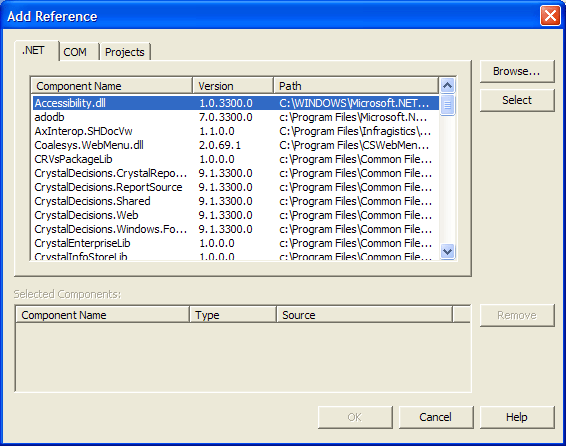
Figure: Add Reference dialog box in Visual Studio.
|
Update: Visual Studio .NET 2005 Beta 2 - Not done
Visual Studio 2005 Beta 2 has a new Add Reference dialog
box, but it is just as slow, and if anything, makes it
harder to reference multiple items simultaneously.
However, the Browse and Recent tabs are an improvement.
Microsoft have acknowledged this for a future release.
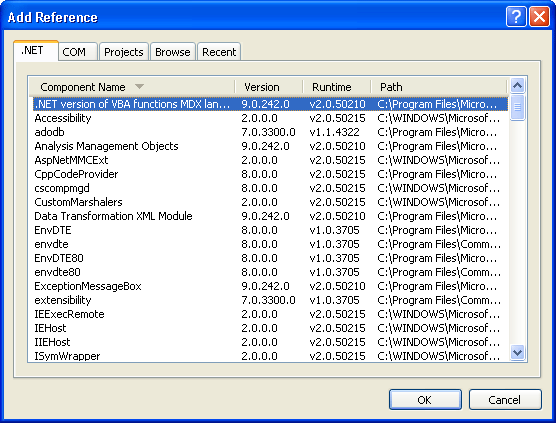
Figure: New References Dialog in Visual Studio 2005
Beta 2
|
-
VSS - Make Integration with Visual Source Safe More Efficient
-
A source safe project will be opened through
"File/Open/Project from Source Safe"
-
A VS project will be able to be shared by sending the URL or
fileshare which can be pasted into Start/Run (e.g.
vss://Path/To/Database/ProjectName) - which would then be
automatically checked out of Source Safe
|
Update: Visual Studio .NET 2005 and Visual SourceSafe
2005 Beta 2 - Partially done
Visual Studio .NET 2005 has an option under the Open
submenu to open a Team Foundation Server project, but
not a SourceSafe project. Microsoft have decided to keep
the SourceSafe option under the Source Control menu so
that all source control options remain grouped together.
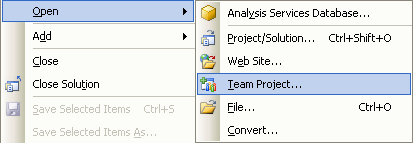
Figure: Visual Studio .NET 2005 Open Menu for Team
Foundation Server
Our suggestion of adding a protocol handler has been
acknowledged by the SourceSafe team.
|
-
VSS - Renames will be intelligent
-
Why doesn't renames work the same as Windows Explorer? The
history shouldn't be lost when you rename an object and it
shouldn't make a copy. A rename is a rename.
-
When you create a file, it also creates a class of the same
name. Therefore if I rename the file, I want to class to be
automatically renamed
-
When a button which has only one event in the handle statement
is renamed, the function name will be automatically renamed
|
Update: Visual Studio .NET 2005 and Visual SourceSafe
2005 Beta 2 - Partially done
Visual SourceSafe 2005 Beta 2 will now support
rename/delete/move propagation from the Solution Explorer
to its database. This functionality is implemented in
Visual Studios Source Code Control Integration layer,
which means that any third-party SCM will be able to
implement this as well.
Visual Studio 2005 supports renaming the underlying class
when the file name changes.
Resharper
can rename a file if you rename a class, allowing you to
have this functionality today in Visual Studio .NET 2003.
Event handler renaming is not present in Visual Studio
.NET 2005, but the suggestion has been acknowledged.
|
-
Visual Basic .NET to C# and Vice-Versa Language Converters
There needs to be an automatic and reliable way to transfer code
between C# and Visual Basic .NET languages. This would be
particularly useful in an environment where both languages are
used, and some developers are more familiar in one language, but
need to know the correct way to exactly reproduce a set piece of
code in the other language. There are several web-based tools
available, but they can only convert about 80% of code. The
functionality needs to be implemented in the compiler and MSIL
so that all language elements are converted with 100% accuracy.
|
Update: Visual Studio .NET 2005 Beta 2 - Not done
Visual Studio .NET 2005 does not have this feature.
Microsoft believe that the total percentage of Visual
Studio users who would use this would probably be fairly
low, not enough to justify adding the feature to Visual
Studio.
|
-
Use Manifest Check Box
The Properties of a Project will have a "Use Manifest" check box
rather than having to copy files into directories.
|
Update: Visual Studio .NET 2005 Beta 2 - Done
Visual Studio .NET 2003 added a feature where you could
call
Application.EnableVisualStyles()
to use themes in your application, however it did not
work correctly.Visual Studio 2005 fixes this bug, and
there is now a checkbox where you can enable or disable
themes.
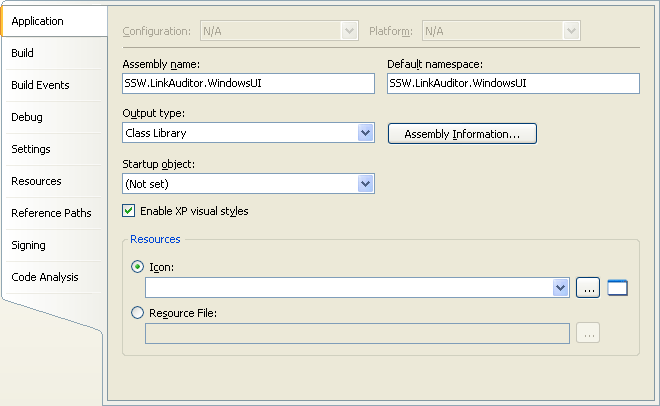
Figure: Enable XP visual styles check box in the
project properties in Visual Studio 2005 Beta 2
|
-
Provide Feedback with Sound
Both Word and Outlook have this fantastic option for those
developers who like to receive information aurally (yes this is
correct spelling and means "through listening") as well as
visually.
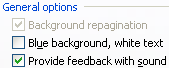
Figure: Provide Feedback with Sound option in Office
|
Update: Visual Studio .NET 2005 Beta 2 - Not done
Visual Studio .NET 2005 does not provide aural feedback,
but Microsoft have acknowledged our suggestion for a
future version.
|
-
Notify of Invalid XML in the Task Pane
Making the Task Pane notify the user that their XML schema (e.g.
in App.config) is invalid would save many users a lot of time.
Because while you have this error you can't copy and paste and
it therefore takes you forever to find the problem.
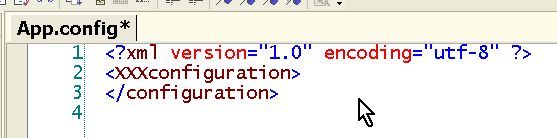
Figure: The Task Pane will notify users if their XML is
invalid
|
Update: Visual Studio .NET 2005 Beta 2 - Fixed
Visual Studio .NET 2005 provides full Intellisense for
XML, including showing validation errors in the task
list.
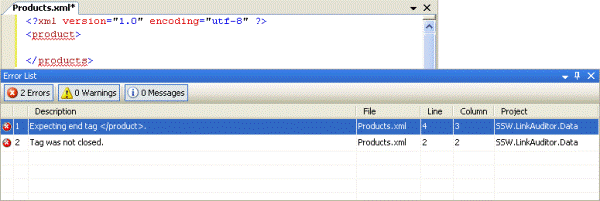
Figure: Visual Studio 2005 highlights XML errors and
shows them in the error list
|
-
"Load Last Loaded Solution" Bypass
I like using the "Load last loaded solution" option. However
sometimes I know I don't want that solution to open when I open
VS.NET. There will be a feature "Hold down shift to bypass" as
there is in access.
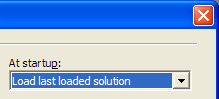
Figure: Let me bypass the "Load Last Loaded Solution" - just
like I could with Access
|
Update: Visual Studio .NET 2005 Beta 2 - Not done
Microsoft have not added this feature this but our
suggestion has been acknowledged for a future release.
|
-
Tab Control ordering problem
This is a known issue about Tab control designer. When you load
a tab control which contains too many tabs, the designer will
move the tabs around sometimes, not following the initial
order. A work around about this is to place some code in
your form constructor, right after InitializeComponent(), to
clear all the tab pages from your tab control and add them again
in the order you want. See problem,
http://www.syncfusion.com/FAQ/WinForms/FAQ_c93c.asp#q959
for more information regarding this problem.
|
Update: Visual Studio .NET 2005 Beta 2 - Fixed
Microsoft have fixed this bug in Visual Studio .NET 2005
Beta 2.
|
-
Need a Linker to make .exe's include required .NET components
I agree with
Joel Spolsky
 when he says we need a Linker:
"For some reason, Microsoft's brilliant and cutting-edge .NET
development environment left out one crucial tool... a tool
that has been common in software development environments
since, oh, about 1950, and taken so much for granted that it's
incredibly strange that nobody noticed that .NET doesn't
really have one."
Source: Joel Spolsky, 2004, "Joel On Software - Please Sir May I
Have a Linker?", Accessed 3 December 2004. URL:
http://www.joelonsoftware.com/articles/PleaseLinker.htmll
-
Shortcut for generating properties
Public properties have a number of advantages to public fields
(see
Do you use Public/Protected Properties instead of
Public/Protected Fields?
) but the syntax for generating them is tedious, particularly if
there is no logic in the accessors:
public int Count


{


   get


   {


      return _count;


   }


   set


   {


      _count = value;


   }


}
Instead we will be able to write:
public int Count : _count;
Alternatively, it would be nice if when you right-clicked a
private field, there were two extra options, "Generate Public
Property" and "Generate Protected Property", which would
generate the block of code above.
-
Designing forms after modifying code
There is a bug in VS.NET!
This bug can put invalid entries in your project files, for
example vbproj and csproj, when you go back and modify the code
in your forms (particularly if you touch the initializer). The
solution is to simply remove and re-add the forms to your
project. This will correct the entries in your VS.NET project
file.
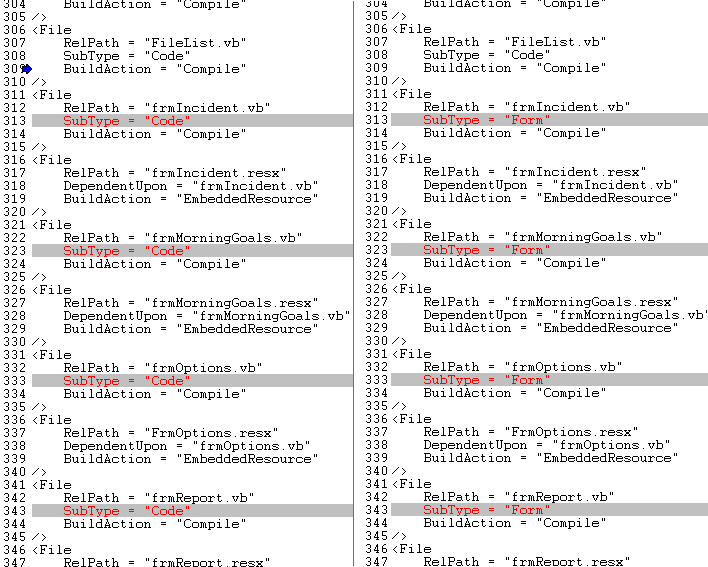
Figure: Code sample
For more information on this bug, please go to our
KB article
.
-
Need ticks and crosses on Reference Paths Page
When a project has an invalid Reference Path, the project tries
to search for references in that folder even though it does not
exist. This adds substantial load time to the project (one
solution loaded in 1 min 53 sec with an invalid reference path).
When that invalid path was removed the time was now reduced to
12 seconds.
To prevent this problem:
-
ticks and crosses will appear on the page below to identify
folders that do not exist,
-
these problems will also appear in the Task List to make it
more visible.
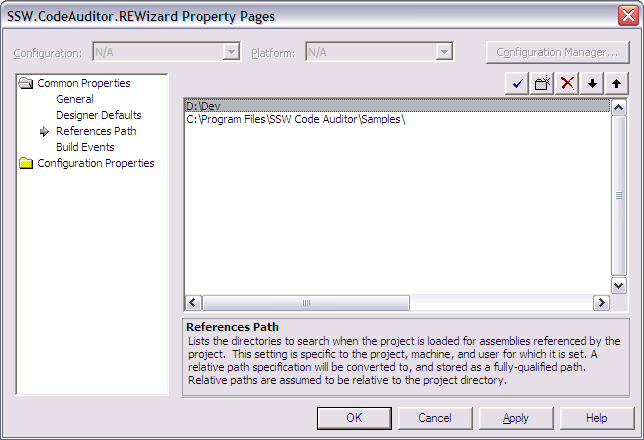
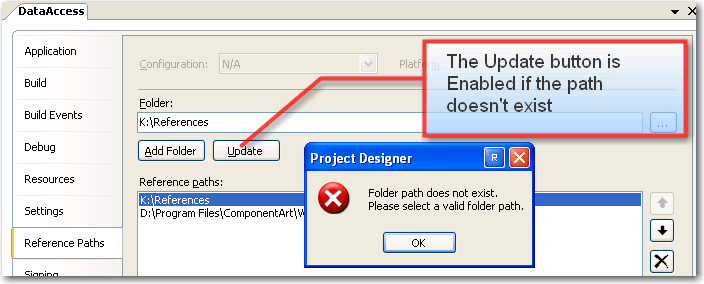
Figure: Reference Paths options screen with "D:\Dev" being the
invalid path.
|
Update: Visual Studio .NET 2005 - Not done
This has not been fixed in Visual Studio 2005. However
some improvements have been made to point 1. For a path
that is not valid the "Update" button becomes Enabled.
We still need the ticks and crosses as suggested above.
|
-
Need a DataBinding Smart Tasks shortcut
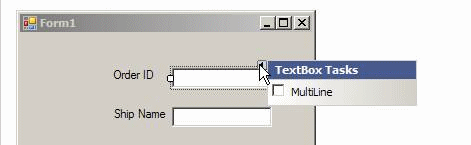
Figure: Smart Tasks menu
Can you add to the Smart Task "DataBindings..." that would bring
up this form
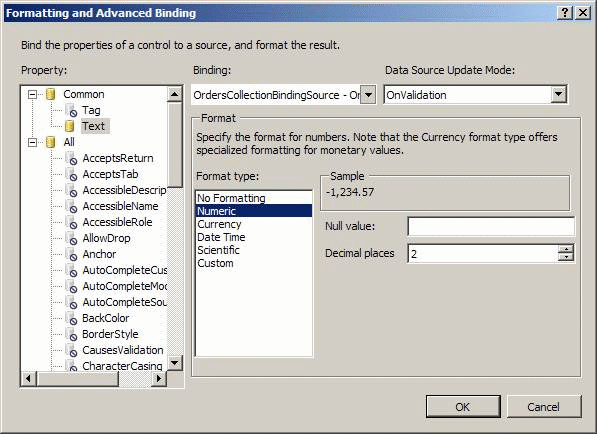
Figure: Formatting And Advanced Binding dialog
-
Improve Data Source Configuration Wizard
-
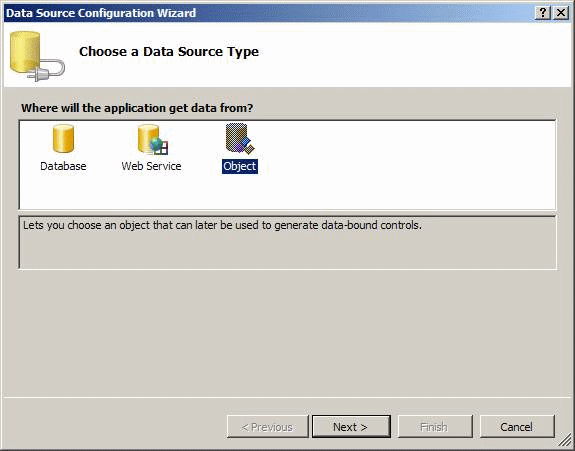
Figure: Choose a Data Source Type
I find most developers either have a plan to try using
Objects or Datasets
I find this bit unintuitive, when a developer uses data
binding they either think "business objects" or "datasets".
Can we reword the description for "Objects" to:
"Lets you choose an object
or a dataset
that can later be used to generate data-bound control."
-
Maybe add a tip that shows this image...
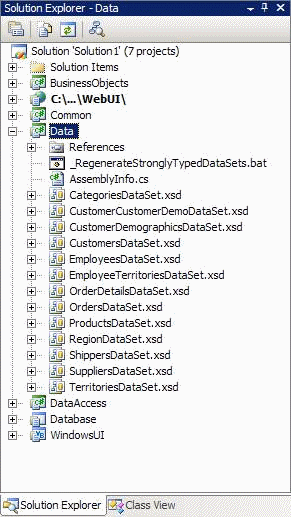
Figure: If you are using Datasets it is good to organize
all your datasets into one project
-
Add a tip: It is Best Practise is to connect to a project
called "Business" (for business objects) or "Data" (for data
sets)
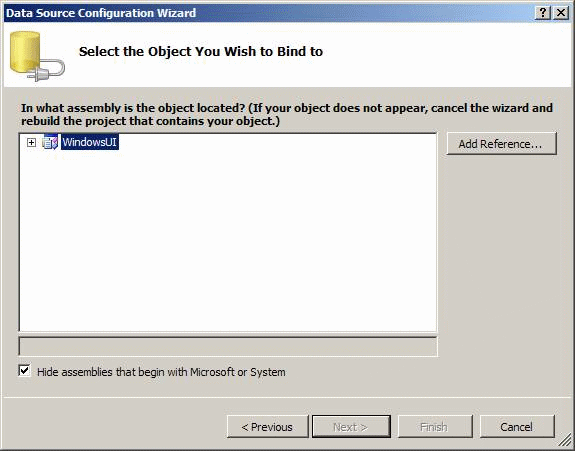
Figure: Add a tip here...
-
File Open dialog will have "Current Solution"
I usually want to add images that already exist in the solution.
It would be handy to add a 4th icon to the File Open dialog
called "Current Solution"
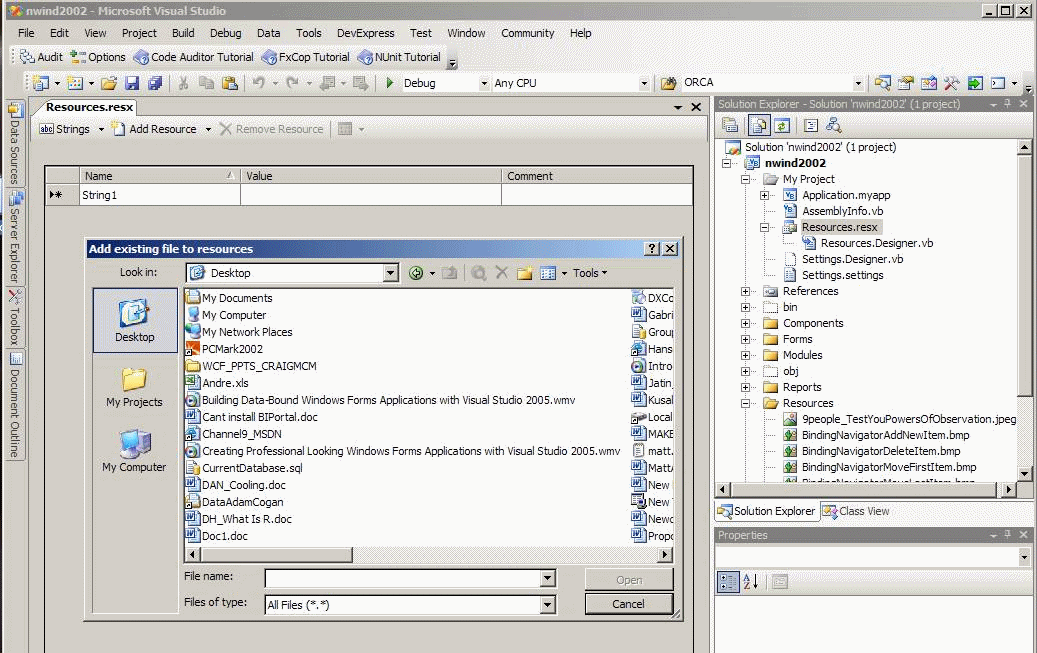
Figure: It would be more convenient if we have a "Current
Solution"
-
will be able to drag and drop a typed dataset onto the form
designer
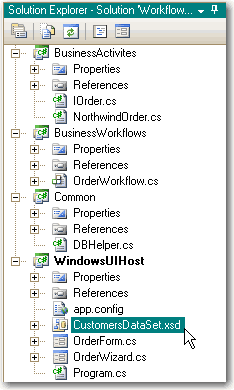
To use a Dataset in a Windows or Web form, you have to create an
instance of the typed DataSet from your DataSets project.
Currently you have to drag an instance of the dataset from the
toolbar then define its type, but wouldn't it be nice to simply
drag the .xsd onto the form designer and have Visual Studio
figure out the rest?
-
-
Figure: I will be able to drag this typed DataSet onto my form
designer to create an instance of it
-
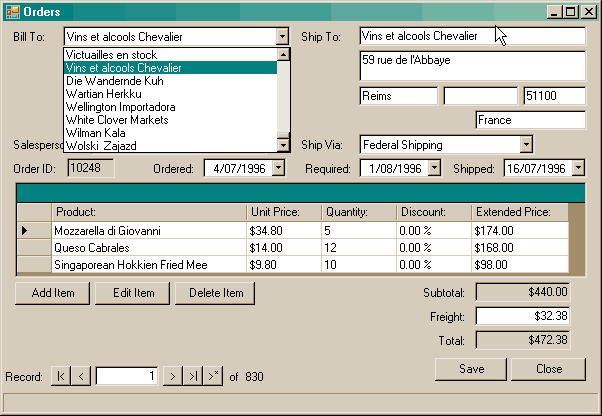
Combo box with lookup button
One of the problems that .NET developers have when they design in
a bound environment is that they put combo boxes on forms which
show a big list. This is not only hard to navigate once you start
showing hundreds of records, it can also causes the form to take
longer to load and put unnecessary strain on the database.
A better option is to include next to the combo box an ellipsis
button "..." which pops up a lookup form.
-
-
Figure: Developers typically return all records for a data
bound combobox field, which can increase form load time and
put unnecessary strain on the database
-
Modification of version numbers
Version Numbers will be consistent there are few exceptions e.g.
for backward compilation, you may have to keep Assembly Version
unchanged and only increase File Verison for each build. But
Visual Studio .NET makes it too easy to let them get out of
sync.
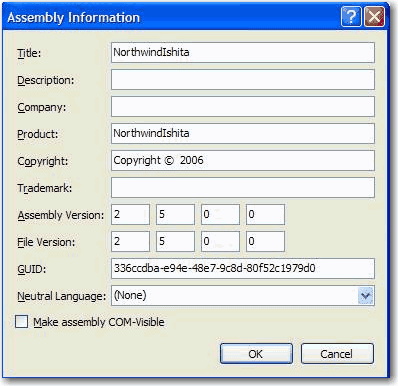
Microsoft, please make these modifications to the labels and add
this checkbox
Assembly Version (when increased it breaks compatibility for
depended .dlls) [ ] [ ] [ ] [ ]
[x] Copy Assembly Version (disables below)
File Version (shown in Windows Explorer) [ ] [ ] [ ] [ ]
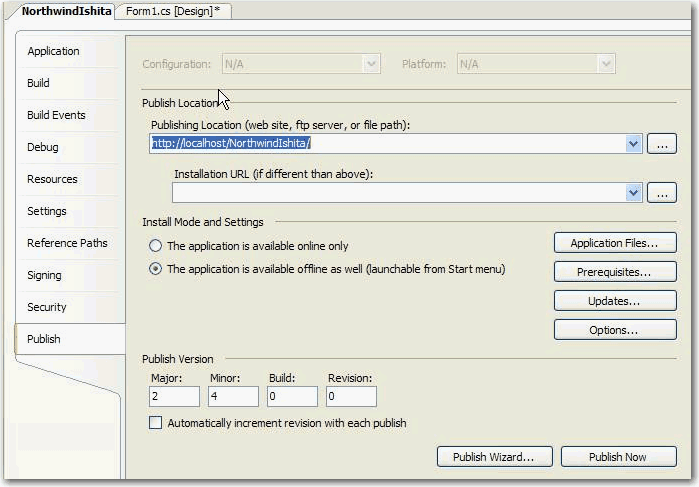
Once you have choosen to go ClickOnce then there is no point to
have a Separate Assembly and File Version and Published version
So Microsoft, my suggestion is to add a checkbox to below form
[x] Copy Assembly Version
(to be disable the 4 version text boxes)
I agree with this suggestion, but have a different take. Once
developers move to ClickOnce deployment, the assembly and file
versions become irrelevant. The Publish Version is your point
of Config Management because it drives the deployment and
update mechanisms. There will be an easy way to keep them in
sync, but I would say it will flow from Publish Version to
Assembly and File Version, not the other way around. Although
bi-directional flow would be best let people manage whichever
one they prefer.
Brian Noyes (Author of Smart Client Deployment with ClickOnce,
Addison Wesley)
-
Load MRU (Most Recently Used) lists as a background process
during Save or Delete
During the process of saving a file to a machine, Visual Studio
tries to load recently used files.
This can cause an unnecessary delay when the machine is not
connected to the network that a previous project was saved on;
after a certain period it times out and goes on to save the
file.
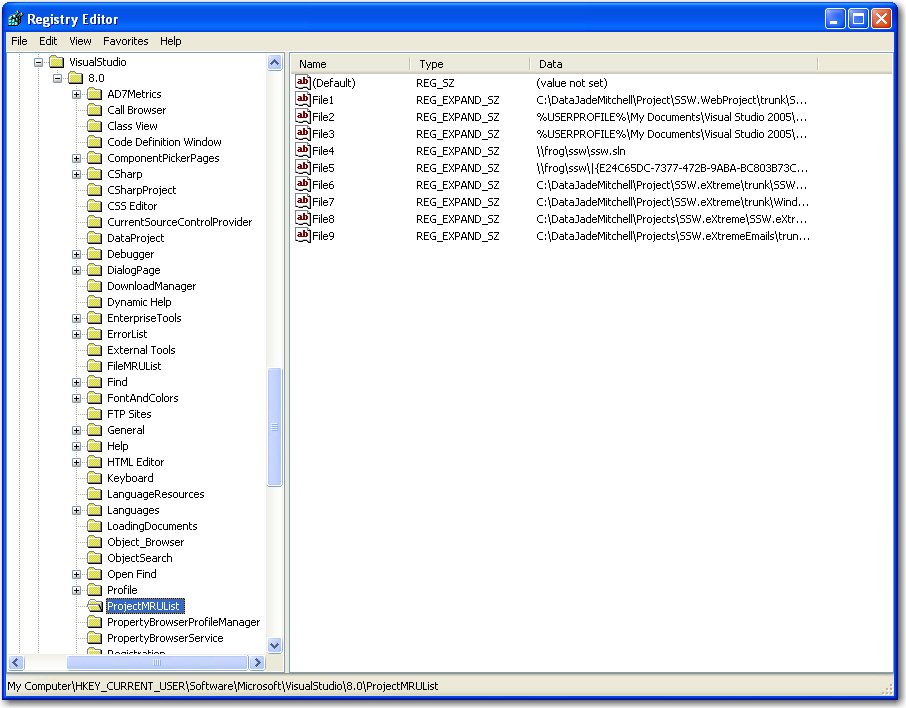
The temporary fix to this is deleting all items in the registry
under the key
HKEY_CURRENT_USER\Software\Microsoft\VisualStudio\8.0\ProjectMRUList
and restart VS2005.
-
-
Figure: Delete all items in the registry key
HKEY_CURRENT_USER\Software\Microsoft\VisualStudio\8.0\ProjectMRUList
This is a common issue in a lot of applications; freezes are
usually caused by trying to access a network resource that is
not available. MRU processes will be executed as background
threads so that they dont lock up the main UI and leave the
developer waiting.
-
Exclude <pre> tag when performing code auto-format
Code auto-format (Ctrl-K, Ctrl-F) is very handy for developers
to product a nicely structured codes. Unfortunately this
function also automatically formats the content of a <pre>
tag where whitespace is significant and formatting will be
preserved.
-
<pre>
Try
   '' sample code
Catch
   '' sample code
End try
</pre>
- Figure: Nicely formatted html code
-
<pre>
Try   '' sample code Catch   '' sample code End try </pre>
- Figure: All formatting in <pre> code is destroyed
-
Need a file association for Web.Config
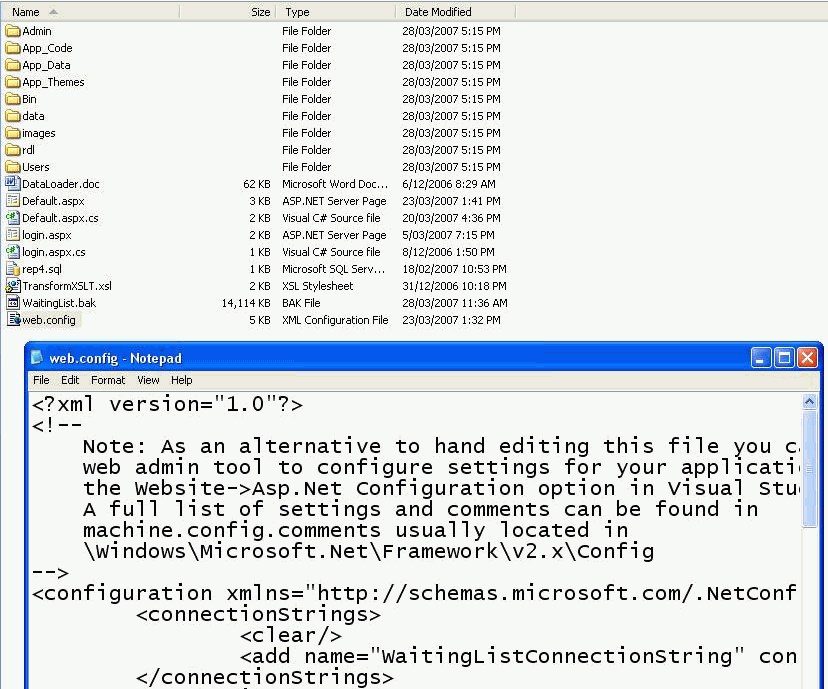
When you first find an ASP.NET solution you are in Windows
Explorer. The first step is usually to have a look in web.config
to look at some of the settings the project uses. e.g.
Connection string.
It would be good if we could double click that and we see a GUI
instead of seeing XML.
Ideally the GUI would show bold settings for the stuff that is
not
default.
-
-
Figure: It would be nice to see a GUI for a web.config instead
of XML
PS: This would be great for ".SLN" files too, so we can see
stuff like the projects that are in it (and even show red
crosses for broken/moved projects).
-
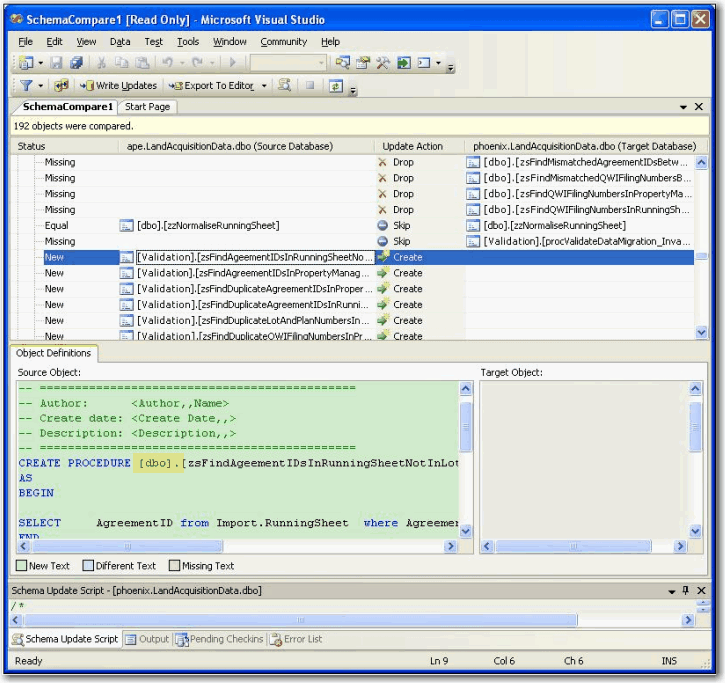
DataDude does not synchronise the Schema for Stored Procedures
The prefix of the stored procedure in the generated script is
not the same as the source. This is not fixed in the Service
Release 1.
-
-
Figure: Datadude recognizes the schema are different, but
generates the incorrect update script.
-
Compare two items of the same type
Sometimes, I want to compare two items of the same type so that
I can tell which one is good. Please allow me to select two
items of the same type in the designer and to get differences of
their properties.
E.g. these ListViews, they've got so many properties I can't
tell them apart!
-
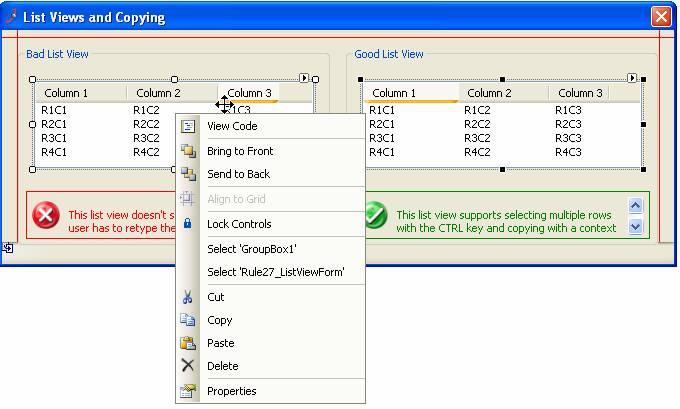
- Figure: Compare two items of the same type.
-
DataDude needs a "select all"
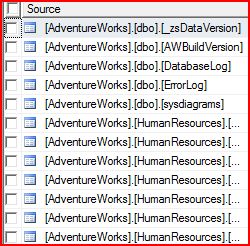
A top checkbox to "select all" in the form.
The header of checkbox column will contain a checkbox by
default. This checkbox can let users select or unselect all the
checkboxes underneath it.
-
-
Figure: SqlServer Management Studio - "select all" checkbox
-
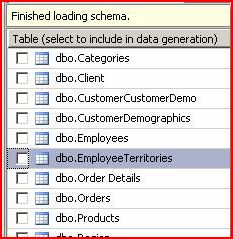
-
Figure: These is no "select all" checkbox in the table list of
DataDude.
-
DataDude will explain the reason of droping constraints
In the data compare, when you make a couple of changes to the
customer table it drops every constraint.
Please add in the comments it creates at the top the reason for
this - it seems unnecessary and melodramatic!
                               /*

                                   This script was created by Visual Studio on 31/10/2006 at 5:02 PM.

                                   Run this script on schnauzer.AdventureWorks_v1.dbo to make it the same as schnauzer.AdventureWorks_v2.dbo.

                                   This script performs its actions in the following order:

                                   1. Disable foreign-key constraints.

                                   2. Perform DELETE commands.


                                   3. Perform UPDATE commands.

                                   4. Perform INSERT commands.

                                   5. Re-enable foreign-key constraints.

                                   Please back up your target database before running this script.

                                   */


                            SET NUMERIC_ROUNDABORT OFF

                            GO


                            SET XACT_ABORT, ANSI_PADDING, ANSI_WARNINGS, CONCAT_NULL_YIELDS_NULL,
ARITHABORT,
                            QUOTED_IDENTIFIER, ANSI_NULLS
                                ON

                            GO


                            -- Pointer used for text / image updates. This might not
                                be needed, but is declared here just in case


                            DECLARE @pv binary(16)

                            BEGIN TRANSACTION


                            ALTER TABLE [Sales].[Customer]
                                DROP CONSTRAINT [FK_Customer_SalesTerritory_TerritoryID]


                            ALTER TABLE [Sales].[SalesPersonQuotaHistory]
DROP CONSTRAINT [FK_SalesPersonQuotaHistory_SalesPerson_SalesPersonID]
Figure: The update script generated by Data Dude
-
Inform the developer when adding referrence
When the wizard adds new reference to the project,developers
will be informed. E.g. If a programmer wants to add a LINQ to
SQL class via wizard, the reference to System.Data.Linq.dll will
be added to the project.Actually, the programmer may don't know
that.
-
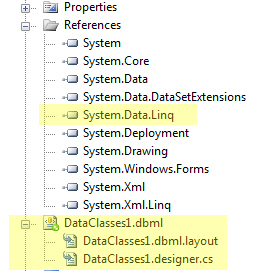
- Figure: A reference is added automatically by wizard.
-
Need "Auto increment the build number on each Compile" check box
Add a check box in below form: [x] Auto increment the build
number on each Compile:
-
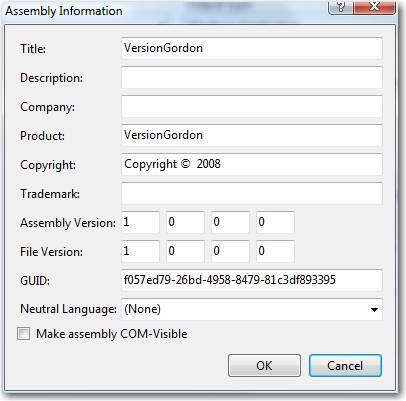
-
Figure: In this form need a "Auto increment the build number
on each Compile" check box.
you can get more from our rules:
Is your version number meaningful?
Do you display the version number publicly?
Do you always update the version number whenever a new build
is made?
-
Add Shortcut Key to format HTML
If we open a page using Word, we can use Control + Space to
remove the style of HTML and make the words with the same font
and size. But in Visual Studio 2008, there is no functionality
like this. With this shortcut, designer can edit and re-format
pages easier.
-

- Figure: Need a shortcut to format HTML.
-
Full 64 bit support
eg. Edit-and-continue in VS is not supported on the 64-bit
platforms
Note: There is a work around. If you need Edit and Continue in
Visual Studio on a 64 bit PC, you can temporarily run the
debugging process with the “x86” option, and then
switch back to “Any CPU” when you terminate with
debugging.
It work perfectly.
-
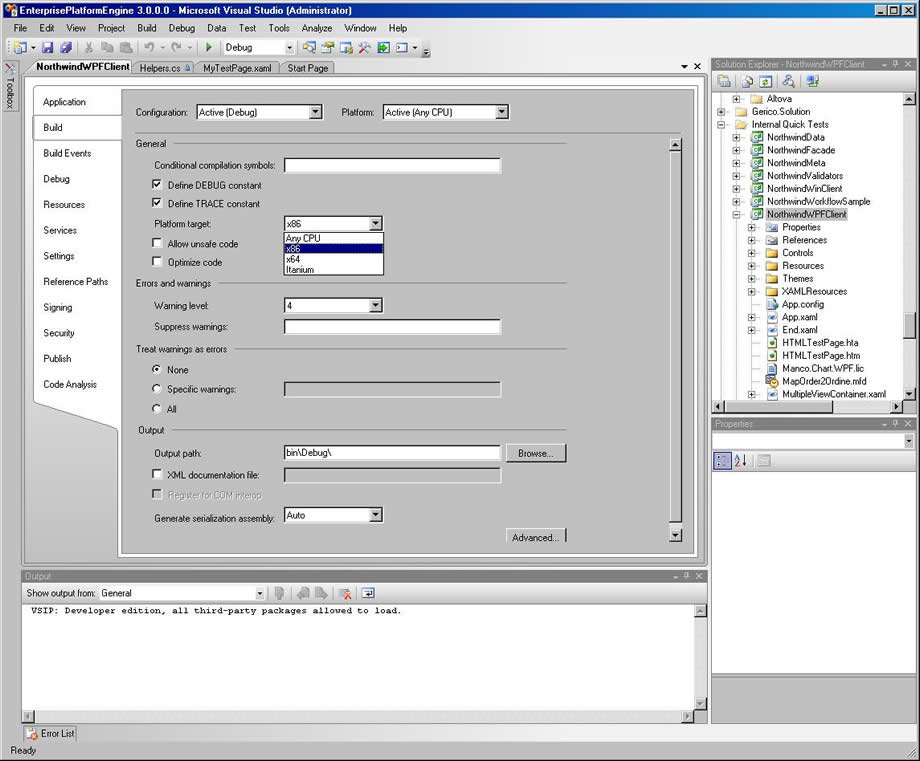
- Figure: How to make Edit and Continue to work on 64 bit
-
Lets give nicer help before dropping into Designer Files
I have a dream...
Make it a goal that we don't let developers drop into these
files?
- Better 1: Tell the user to look in the app.config file.
-
Even Better 2: Tell me if the name of the Config element you
are looking for.
- Even Better 3: Drop into the config file.
-
Even Better 4: Check for a Connection String and then popup a
nice connection form.
-
Even Better 5: Give a list of common mistakes with ticks and
crosses (each team would be responsible)

|
Valid Config Element |
|
|
Valid Connection String |
|
|
Ping to Server OK |

|
Database does not exist |
-
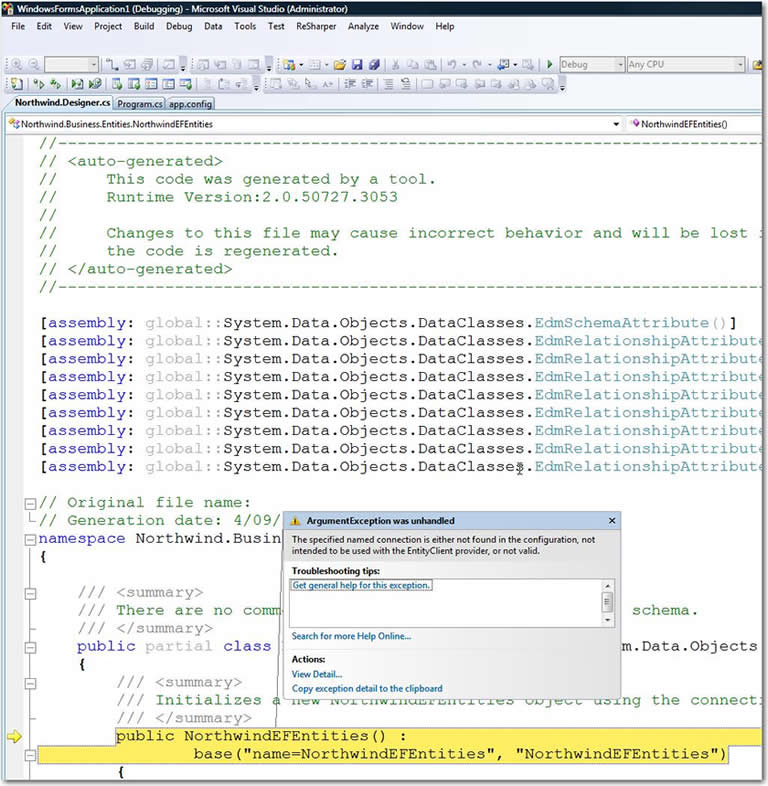
- Figure: This is not helpful
-
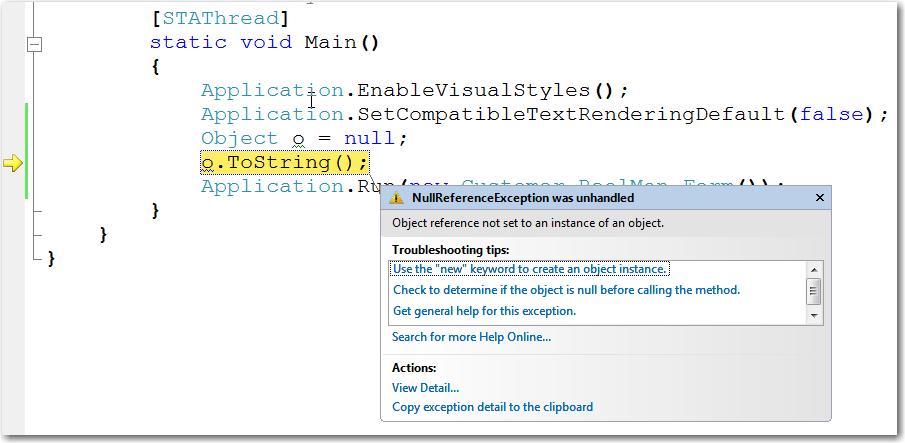
- Figure: This is a good start
I have a dream.... Each team that works uses VS.NET eg. LINQ
team, Reporting Services team... would have to have the top 20
issues from beta testing.... entered here before they ship
-
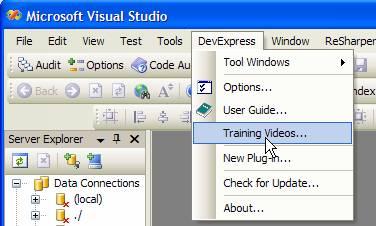
Provides "Training Videos" menu item in the help menu
Training Videos provide a straitforward way to help the user
look into your product and help them have a good understanding.
It's better to have a "Training Videos..." item in the help
menu.
-
-
Figure: It's better to provide such a "Training Videos..."
menu item
See our rules
Menu - Do you have a Training Videos item?
-
Add a "Read UI/Show Me" menu item in right-click context menu
I would love to see:
-
A "Read UI/Show Me" option on all controls if they are using
Visual Component
-
Generally help to have people "read the UI" like they "read
code"
- This would be useful for beginners
- This would be useful for managers reviewing code
- This would be useful for VB6 guys
Eg. One way would to implement this would be:
-
right-click ProductID Textbox and select "Read UI/Show Me"
-
it would then filter out all irrelevant Component Tray icons
(slowly fade out)
-
it would then filter out all irrelevant Properties (slowly
fade out)
-
now it could then use some of Code Rush like big arrows, that
would point first to the DataSet in the left hand toolbox,
then it would simulate it being dragged onto the form
-
then they would see it moved automatically to the component
tray
-
then they would see the arrow pointing to the properties in
the right hand property window
-
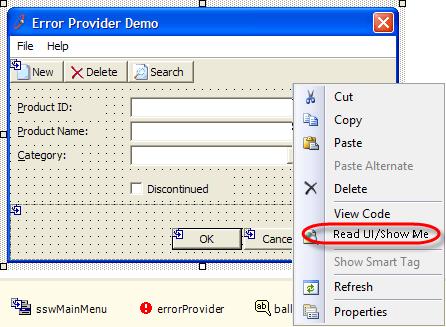
- Figure: I would like to see a "Read UI/Show Me" menu
-
Rather than add a file to my project and get 600 compile errors,
help me automatically fix it
When there's a compiler error that is because of a missing
assembly reference, VS.NET should be smart enough to offer me
suggestions to add the Assembly.
If there are multiple matching assemblies, show a list that lets
me choose which one is the one I want.
So instead of 600+ errors that says something to the effect of:
			  The type or namespace name 'Linq' does not exist in the namespace 'Microsoft.SharePoint' (are you missing an assembly

			   reference?) C:\Temp\AdamCogan01\VisualWebPartProject1\VisualWebPartProject1\TeamSite.cs 997 25 VisualWebPartProject1
Analyze the code and find the yellow
			namespace VisualWebPartProject1 {

			using System;

			public partial class TeamSiteDataContext : Microsoft.SharePoint.Linq.DataContext {
-
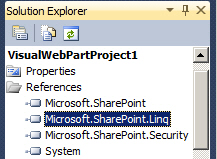
-
Figure: The yellow should be enough to ask the user if they
want to that this .dll
-
Is there a Windows standard UI convention against this?
This is a little one, but the Project Menu in Visual Studio is
reasonably prominent.
I believe one dialog form, should get one menu item (on the same
menu).
E.g. The TFS Team have done this correctly.
-
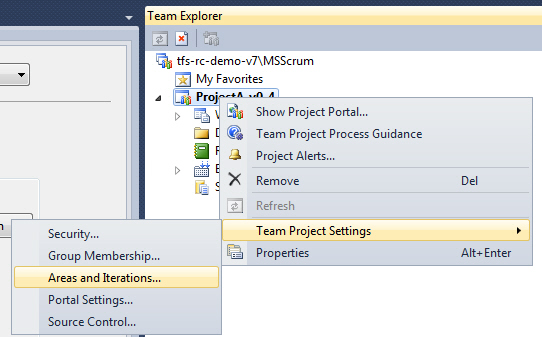
-
Figure: The TFS team gives one menu item for a form with 2
tabs
-
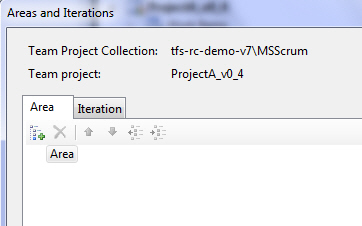
-
Figure: Good - This is the resulting form (One improvement I
think would be to rename the tabs, to be 'Areas' and
'Iterations')
Versus
The VS.NET team who did it incorrectly
-
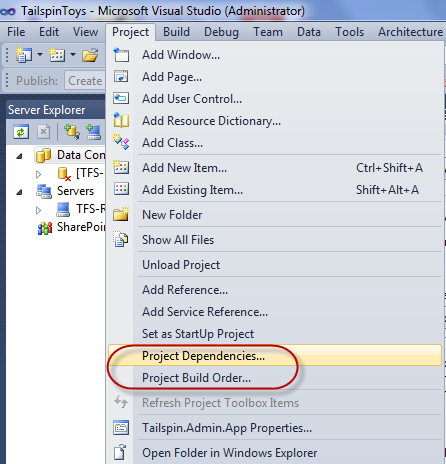
- Figure: Bad - 2 menu items for one form (with 2 tabs)
-
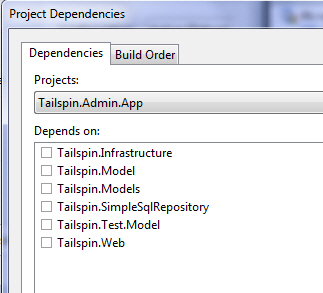
- Figure: This is the same form invoked
-
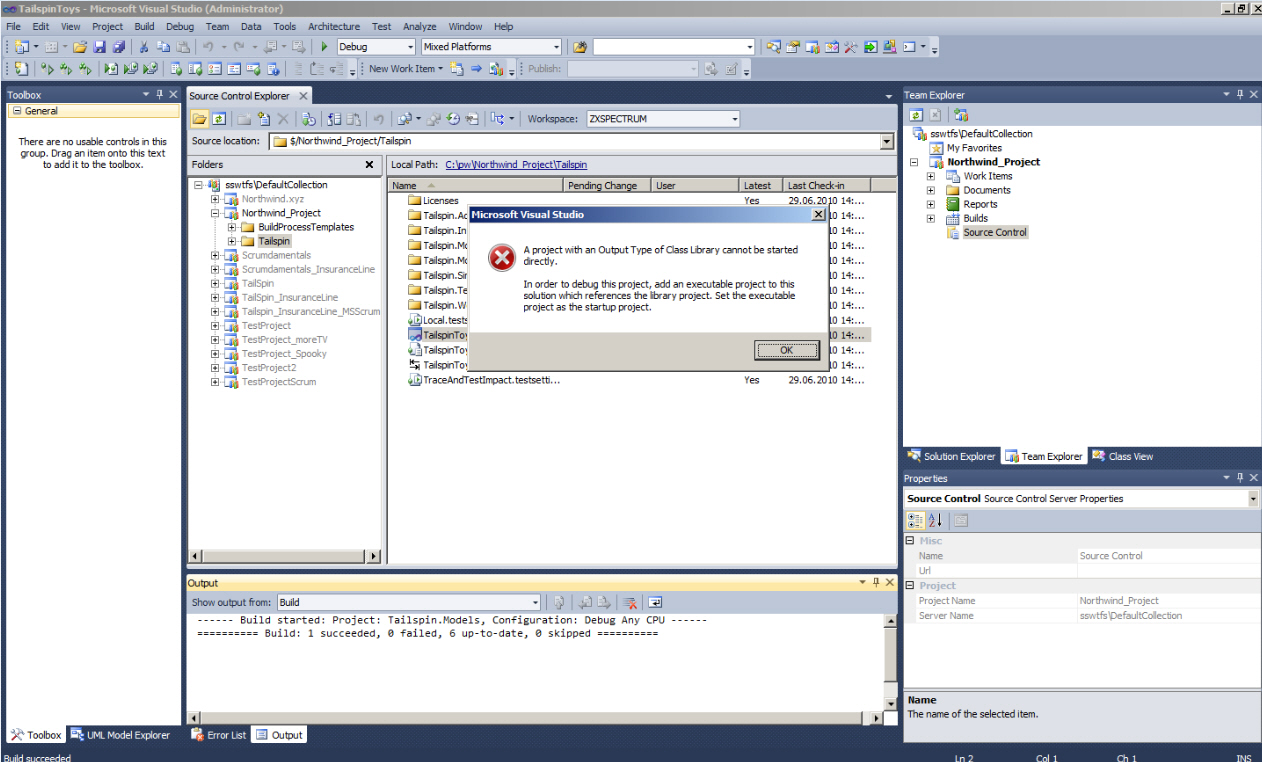
VS 2010 - Help me know what to do when trying to solve 'Output
Type of Class Library cannot be started directly'
My C++ guys are stuck.
I thought C++ guys were clever
See them work out how to use VS 2010 for the first time :)
I was very surprised they all had no idea how to click the
"Solution Explorer" tab.
Suggestions below...
-
-
Figure: Why is it telling them to 'Add an executable project'?
(There is already one)
Now I think of it...this stupid dialog does my head in...
Suggestion 1: Why is the 'Solution Explorer' tab not mentioned
in this horrible message box?
Suggestion 2: Even better, why not have the 'Solution Explorer'
tab selected?
Suggestion 3: Change this text from
---------------------------
Microsoft Visual Studio
---------------------------
A project with an Output Type of Class Library cannot be
started directly.
In order to debug this project, add an executable project to
this solution which references the library project. Set the
executable project as the startup project.
---------------------------
OK
---------------------------
To
---------------------------
Microsoft Visual Studio
---------------------------
Your currently selected project is 'xxx'.
A project with an Output Type of Class Library cannot be
started directly.
Select the 'Solution Explorer' tab and select any of these
valid projects:
- xxx
- yyy
In order to debug this project, add an executable project to
this solution which references the library project. Set the
executable project as the startup project.
---------------------------
OK
---------------------------
Suggestion 4: make the message boxes better by including an
image like this
-
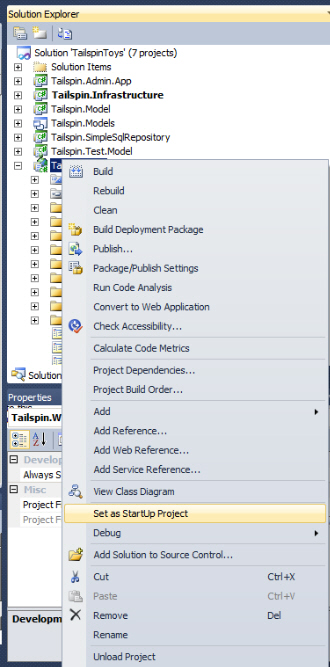
- Figure: Show a newbie an image like this
Suggestion 5: Change the whole form from a dumb message box
(with only text), to an intelligent form with the above message
plus combo with valid projects they can select and press a
"Continue" button
-
-
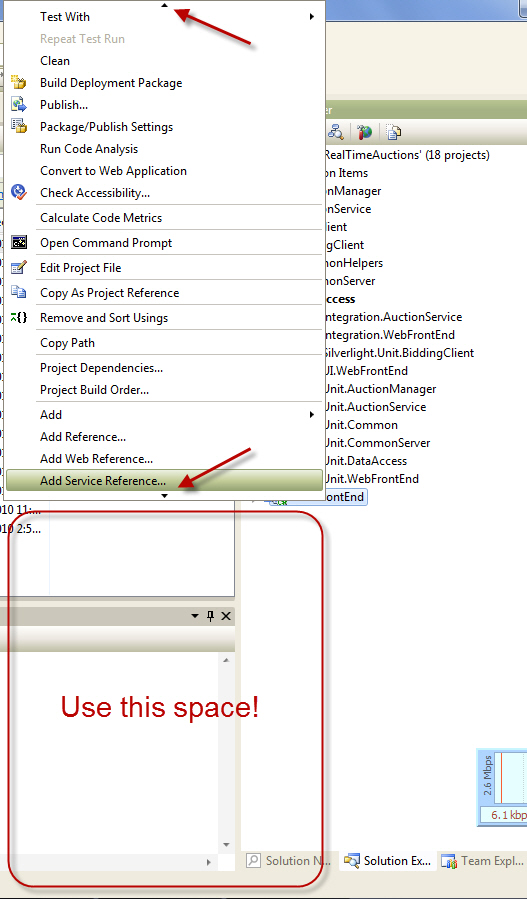
-
Figure: Can we use this space please + make the node I clicked
on visible (in this case it says 'WebFrontEnd')
-
Nice URLs for the Gallery
Have I mentioned getting nice URLs would be great for the
Gallery?
Eg.
http://visualstudiogallery.msdn.microsoft.com/3d37ce86-05f1-4165-957c-26aaa5ea1010/
to
http://visualstudiogallery.msdn.microsoft.com/Test-Attachment-Cleaner/
-
Improve the VS.NET 2010 setup experience #1
It is already great, so these are little ones:
-
Can we have a 2nd status bar so we know the total time
remaining?
-
Can you have the reboot any earlier (before the VC 9.0 and VC
10.0 Runtimes) and tell us specifically
"There will be one reboot required in approximately 3 minutes"
-
Let me resize the window so it can go from the top to the
bottom of the screen
-
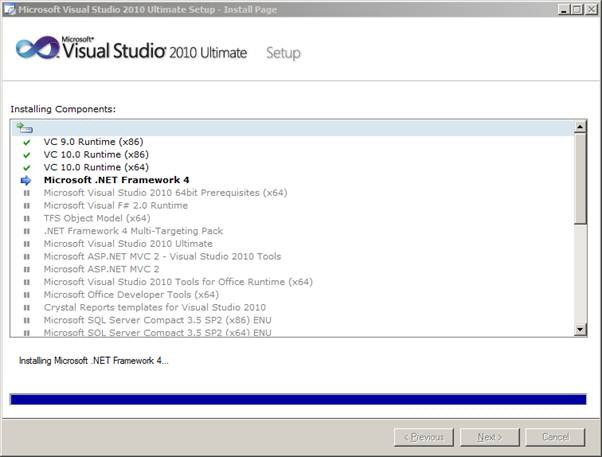
-
Figure: 3 little things would make this form even greater
-
Improve the VS.NET 2010 setup experience #2
-
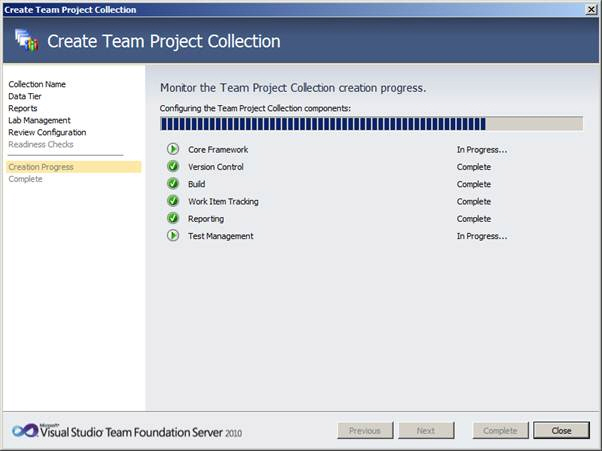
-
Figure: Bad - It is currently running so "Close" should be
"Cancel"
-
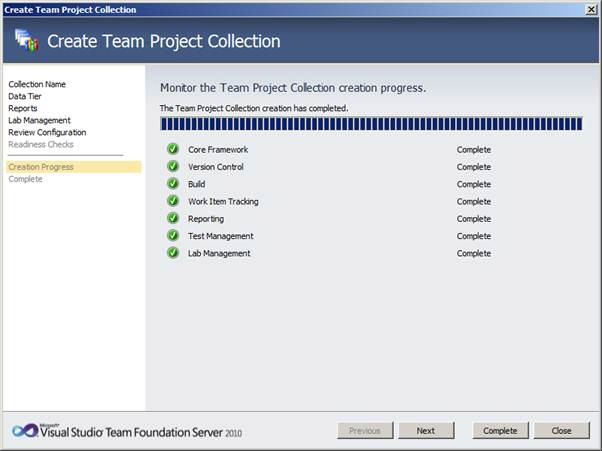
-
Figure: Good - Now it shows "Close" now it is finished? But
bad as I am not sure whether to "Next" or "Complete" or
"Close" now
-
Additional Menus should indicate where they come from
If I am I am looking at an additional menu on someone elses PC,
there should be a way to see where they came from.
2 ideas... add an additional "About" menu item... or add a
tooltip with the assembly name
-
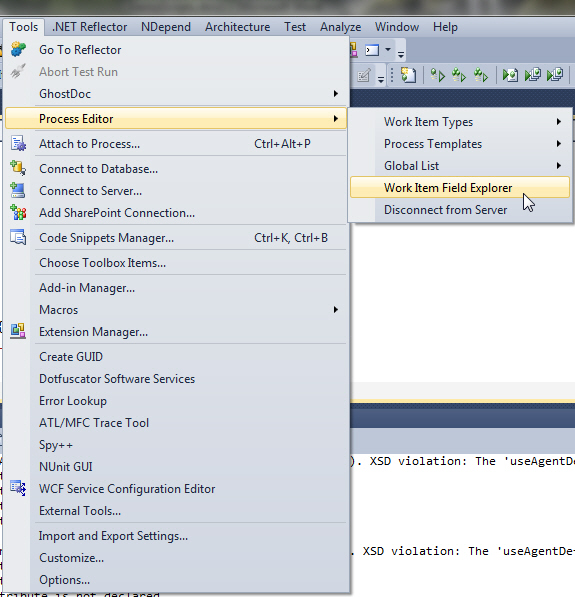
-
Figure: The "Process Editor" menu should indicate that is
comes from VS2010 PowerTools
-
Help | About - Help me see what was the last thing I installed
- Can I have a 2nd column in this grid "Date Installed"
-
And sort it descending, so I can see the most recent gear I
have put on this VM
- And be super cool and add a link "Tweet this extension"
-
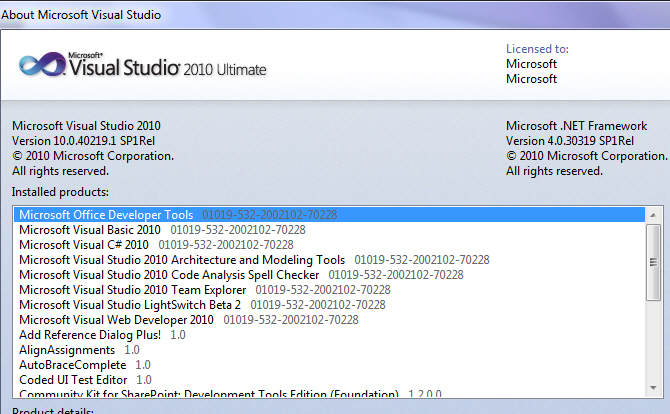
- Figure: Put this in descending order of installation
-
-
Figure: Give me something to read while waiting… While
looking at this screen I would like to see the list (in
descending order) of the last things installed (from
Extensions to Service Packs)
-
Setup.exe - Help me know not to install SQL Server 2008 Express
Service Pack 1
-
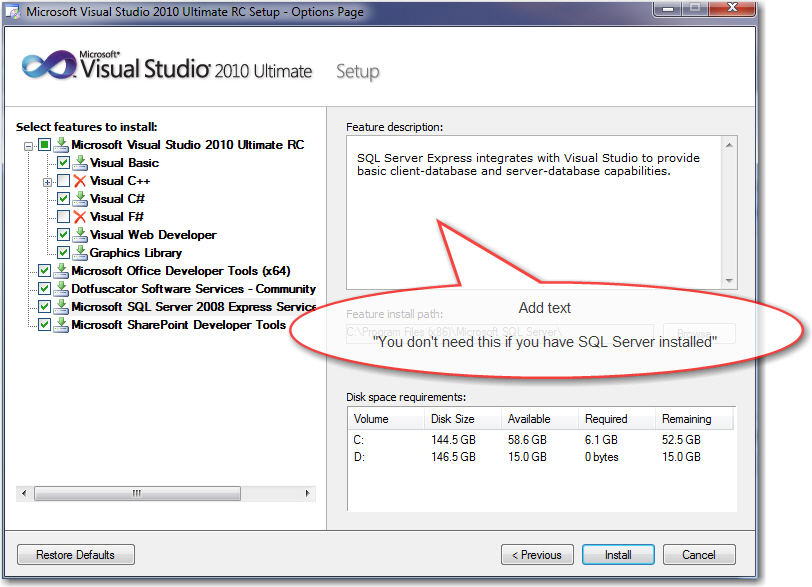
- Figure: Just a little bit of text
-
Let me click around (Little one) - without making me reach for
the keyboard
I would love to be able to click around, when I am exploring...
when I am demoing.... and not have to reach for the keyboard to
hit F7 (I have never really used right click)
I believe this is the
*most*
common operation that is done from this window.
PS: I wish I could see stats on what the top operations from
this form are?
-
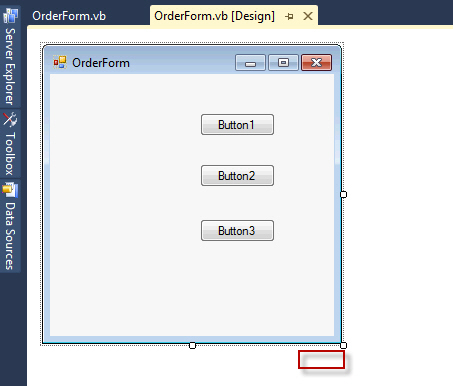
-
Figure: In the red square, add hyperlink 'View Code' (or maybe
a smart tag icon)
-
Dev11 Feature Request - 'View Class Diagram'
-
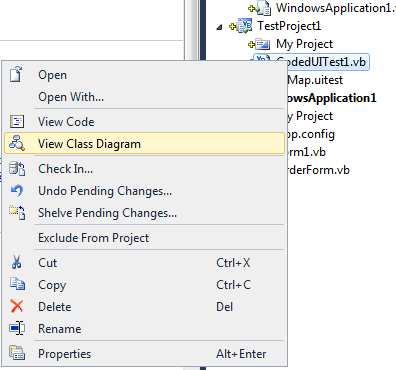
-
Figure: "View Class Diagram" adds a file! Avoid surprises and
rename it to 'Add'
-
VS Extension Manager - help me intelligently on search
-
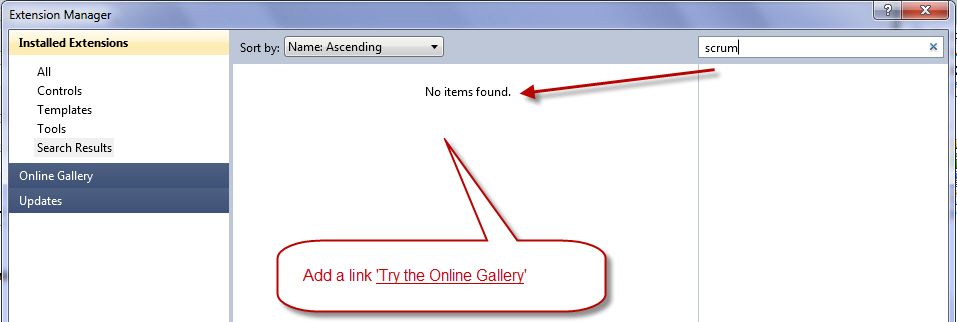
- Figure: Add a link 'Try the Online Gallery'
-
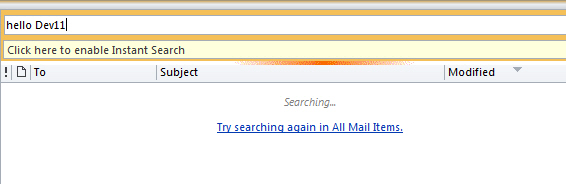
- Figure: A good example from Outlook
-
Give me a sensible Default Tab Order
The tab order when you create a new form defaults to the order
you add controls. The default should be more sensible - from the
top of the form to the bottom.
-
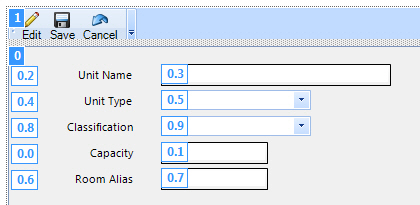
-
Figure: Bad Example - The default tab order is based on the
order controls were added and does not make sense
-
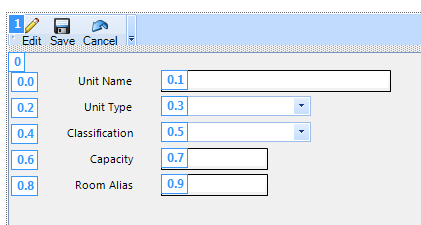
-
Figure: Good Example - The default tab order is from top to
bottom