would you like your software to be considered for this list?
Give us your details
.
-
Red Gate SQL Compare
One day in 1999 I wanted to compare two SQL server databases...
basically I wanted to find a utility that was like our SSW
Renovator. Luckly I found a program that is both well written and
works as it would have, if I had have been forced to write it
myself. That is why it is one of my favourite SQL server
utilities.
SQL Compare is an extremely useful tool which you can use to
compare and synchronize the structure of SQL Server databases.
This is useful in a development environment when changes made to a
local database need to be pushed to a live database on a remote
server. Traditionally, this meant spending hours trawling through
database schema, hand-generating migration scripts. SQL Compare
will automate this process for you. It will compare and
synchronize all database objects, including, but not limited to,
tables, stored procedures, views and user defined functions.
-
SSW SQL Deploy
Schema changes are painful! In the early days, when we deployed a
rich business applications to our client's PCs, we hit problems
when we had schemas out of sync. We would avoid any changes to
schema because we could not handle change.
Worse still when we did have an unavoidable structural change we
found we could not trust the client to manually run .sql files via
Query Analyzer or OSQL.
So SSW SQL Deploy solves this problem by automatically performing
Database updates as a part of your application deployment. It is
as simple as bundling the SSWSQLDeploy.dll and adding a few lines
of code to your application. From that point on database changes
will happen automatically. Specifically your application will now
be able to:
automatically Create the database if it doesnt exist
automatically Upgrade the schema when you install a newer version
Reconcile the schema to check the schema is correct
For more information see
Rules to Better .NET Projects - Reconcile
Note: Yes we love Red Gate SQL Compare for comparing the old
database with the new and synchronises the schemas - but don't use
it as a crutch! If you need it for every application deployment
you have a problem in your process. So we let SSW SQL Deploy
handle the deployment automatically and only use Red Gate SQL
Compare when the backends have got out of sync and we need to know
the difference.
Each application should have 2 buttons included; Upgrade and
Reconcile.
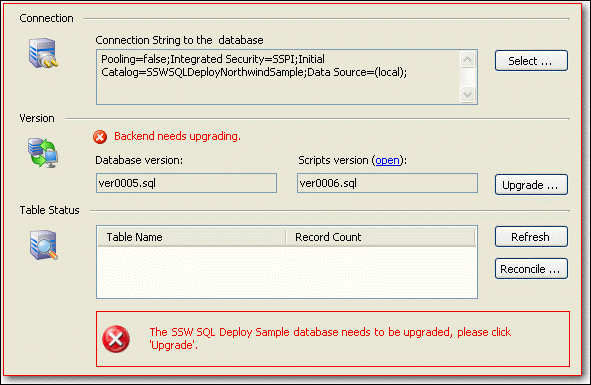
Figure: Add the SSW SQL Deploy database control and your
application will be able to Create, Upgrade and Reconcile the
backend.
Try out SSW SQL Deploy
for free.
-
SSW SQL Server Auditor
Before I had SQL Server Auditor what I use to do during design
reviews was to ask for the same old changes - over and over again.
eg. missing clustered indexes, nvarchars used where they werent
needed, DateTime fields where it could fit in SmallDateTime.
Today all these checks are now handled by SSW SQL Auditor. I am
always grateful for the time it saves me and the consistency I
get.
-
Instant SQL Formatter
-
Red-Gate SQL Doc
-
SQL Scribe
I had never thought a document utility would make it into my
favourites. You can click though each link to take a closer look
at the object making the document alive, instead of printing off
tens of thousands of pages.
SQL Scribe is a documentation tool created with the developer in
mind. SQL Scribe will interrogate a SQL 7.0 or 2000 database and
extract the database schema. This schema information is stored
in an MS Access 2000 database. Using any readily available
browser the developers can navigate though the system
documentation which is laid out in a easy to read and logical
way.
-
Apex SQL Doc
Apex SQL Doc is another document utility. With this tool you can
document your database into Compiled Help or HTML documentation.
Compareded with SQL Scribe, it is easier to deploy or publish the
document as it does not need any data store for schema
information.
-
LECCO SQL Expert
LECCO SQL Expert is the only complete SQL performance tuning and
optimization solution offering problematic SQL detection and
automatic SQL rewrite. With its built-in Artificial Intelligence
(AI) based Feedback Searching Engine, LECCO SQL Expert reduces the
effort required to optimize SQL and makes even the most junior
programmer an expert.
Developers use LECCO SQL Expert to optimize SQL during application
development. DBAs eliminate problematic SQL before users
experience application performance problems by using LECCO SQL
Expert in production systems.
-
Speed Ferret
SPEED Ferret is a global find & replace utility that works
with Microsoft Access, SQL Server, and Visual Basic. With SPEED
Ferret you can rapidly search all of the property values and all
of the source code in all of your projects at one time. Find out
where an object is used before modifying or deleting it. Rename an
object while quickly updating all references to it.
-
XPSMTP
XPSMTP provides a SMTP based SQL Mail solution for sending MIME
based email over SMTP, implemented as an Extended Stored
Procedure. It does not require any software to be installed, just
a SMTP email server that can handle the outgoing mail request.
XPSMTP is using TCP/IP sockets to communicate to port 25. XPSMTP
does not spawn additional threads, the xp_smtp_sendmail request is
handled on the same thread as it is being called on by SQL Server.
Each call to xp_smtp_sendmail establishes a connection to the SMTP
server and disconnects when done sending the email. The connection
is created using asynchronous communication and aborts based on a
timeout value (@timeout which by default is 10000 milliseconds, so
10 seconds).
Key features are as follows:
-
Configurable SMTP port support (instead of hard coded port 25)
-
Support for text/html MIME encoding besides the current
text/plain MIME encoding
-
Ability to pass multiple file attachments (adding @attachments
parameter)
-
Ability to read message text from file, to bypass the XP
parameter size limit
SQL Server SMTP Mail XP

-
AGS Crosstab Builder for SQL 2000
AGS Crosstab Builder for SQL 2000 is an extended stored procedure
that will generate crosstab results from standard SQL statements.
You now do not have to run OLAP services to generate what
Microsoft Access has been able to do for years. AGS Crosstab
Builder for SQL 2000 is simple to use.
If you have SQL Server Reporting Services, you should use a Matrix
control instead, as it offers drill down functionality. If SQL
Reporting Services is unavailable, we would typically use the AGS
crosstab in the following scenarios.
Windows Forms:
- Displaying crosstabs in the .NET Windows Forms datagrid
Web Forms:
-
In an ASPX datagrid. However, no customisation of column styles
is allowed in this case because it is based on a non-typed
dataset. e.g. cant bold the total column
-
When using Infragistics UltraWebGrid - but you should make sure
that you have repeating data to get full use of the group
expansion functionalty
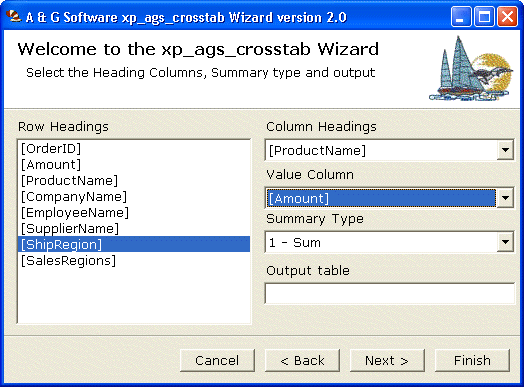
Figure: AGS Crosstab Builder
AGS Crosstab Builder for SQL 2000
-
myLittleAdmin for SQL Server 2005
myLittleAdmin is the first web-based management tool specially
designed for MS SQL Server 2005. It enables you to manage most
objects of your databases and servers and act most operations
through a web browser. It has very similar interface as SQL Server
Management Studio but it's faster and easier to use.
myLittleAdmin for SQL Server 2005
